
The weekly report is ready on Monday morning. By Wednesday it reaches the team as a screenshot in the group chat, captioned "negative sentiment is up." Product asks which posts. Whoever owns the report opens the dashboard, sets the date range again, and pastes the links.
Voice of customer software is good at producing reports. Getting the finding to the people who need to act on it is the part that usually breaks.
The DataScaler Lark integration sends weekly reports, report-ready notifications, and anomaly alerts straight to Lark. You can follow up on topics, platforms, or the original posts in the same chat, without going back to the dashboard first.
What the Lark integration does
Task | When it helps | What comes back |
|---|---|---|
Ask about visibility, sentiment, customer feedback, and competitors | Before a weekly review | An answer with the relevant public discussion |
Receive weekly reports and report-ready notifications | On a recurring review cycle, or while waiting on a new report | The report update and where to open it |
Follow up on an anomaly alert | When volume, sentiment, or one topic shifts | The platforms, topics, and posts involved |
Move a finding into a Lark document | When product, marketing, or support takes over | The conclusion, date range, and source links |
The scope is narrow on purpose. The assistant reads only messages sent directly to it. It reads the user's name and nothing else from the directory, and it does not need a directory scope.

Example: negative conversation is rising
The weekly report shows more negative conversation over the last 30 days. The brand lead starts in Lark:
Which topics drove the increase in negative conversation over the last 30 days?
Once one topic stands out:
Which platforms did these come from? List the relevant posts.
Anything that needs a closer look gets checked in DataScaler, against the posts and the date range. The confirmed finding then goes into a Lark document with its original links, so product or support starts with the background instead of a chart nobody can trace.
For deciding which public feedback deserves a response, see how we approach voice of customer analysis.
When teams use it
Before the weekly review
The report arrives in Lark, so nobody prepares a second set of screenshots. Questions about a topic, platform, or post stay in the same chat, and the chat is still there after the meeting.
After a launch
Discussion volume usually rises after a launch, and one widely shared post can move the sentiment percentage for a few days. Read the alert, see which posts caused the change, then decide whether it needs a response. A percentage alone doesn't tell you which post to look at.
When another team takes over
Product, marketing, and support look at the same issue from different angles. A Lark document with the conclusion, date range, and source links gives the receiving team enough to start without re-running the search.
What stays in the web app
Lark is for receiving an alert, reading the summary, and asking the first questions. Go back to DataScaler when the work needs filters.
Task | Where | Why |
|---|---|---|
Receive weekly reports, report notifications, and anomaly alerts | Lark | The alert lands where the team already works |
Ask follow-up questions about topics, platforms, and posts | Lark | No tool switch to keep asking |
Change the date range or filter platforms | DataScaler web app | The full set of filters lives there |
Compare competitors or review posts one by one | DataScaler web app | Complete lists and more sources |
Hand a finding to another team | Both | Confirm in the chat, keep it in the document |
What you see in Lark is public discussion from social platforms, communities, and review sites. Support tickets, CRM notes, interviews, and surveys are a separate part of customer feedback, and they still need their own source.
How to connect DataScaler and Lark
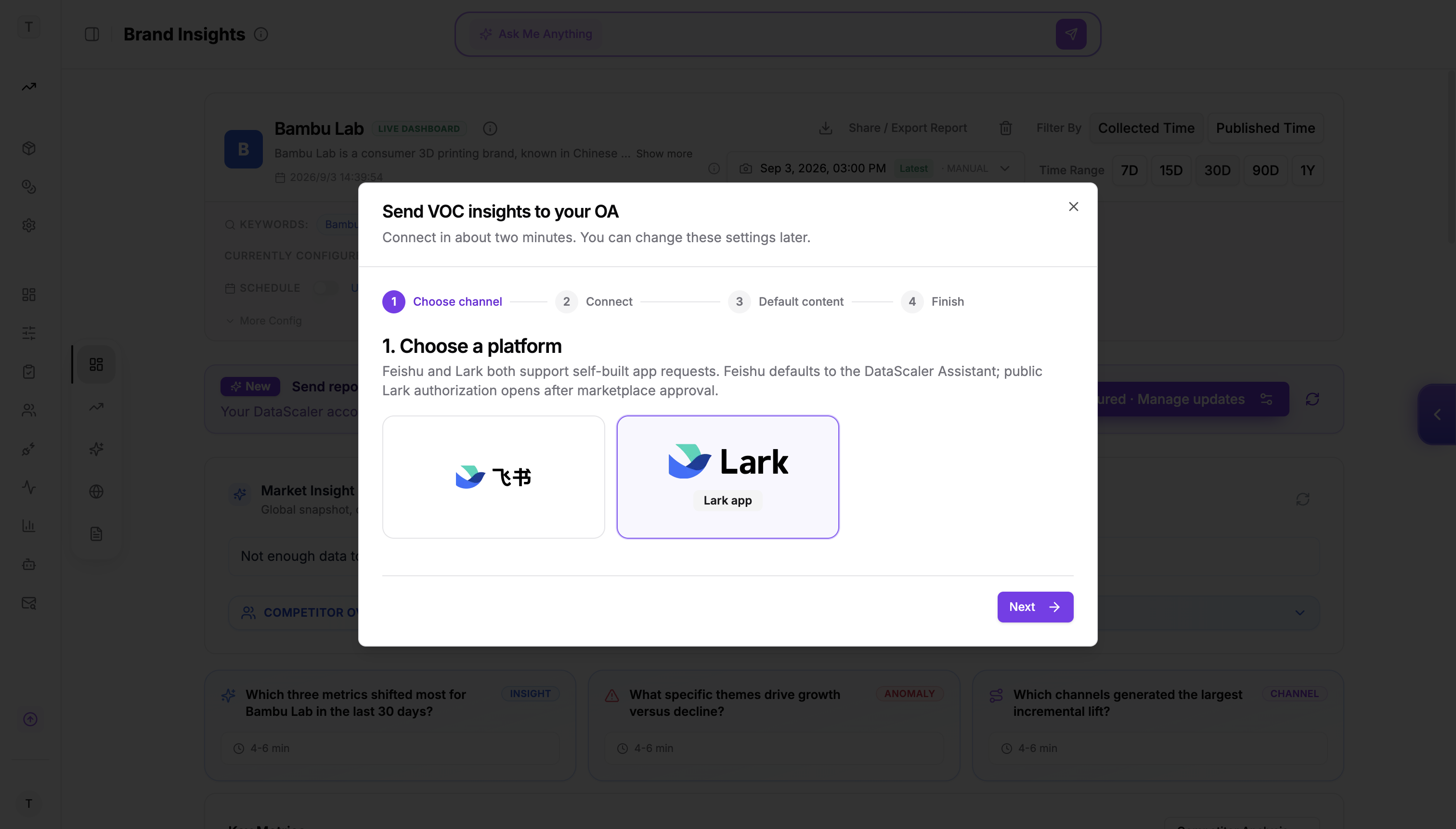
The integration is rolling out gradually. Contact us if your team would like early access. There are two setup paths:
- DataScaler assistant for Lark: add the public Lark assistant, then scan the Lark authorization code to connect your DataScaler account. There is no app to configure on your side.
- Enterprise self-built Lark app: use this path if your company wants to manage its own bot, permissions, and availability.
Feishu has its own DataScaler assistant and QR-code flow. A Feishu account cannot use the Lark authorization code, and a Lark account cannot use the Feishu connection code.
Once connected, choose which weekly reports, report notifications, and anomaly alerts go to Lark from Brand Insights in DataScaler.

See the product update and current availability
No brand report yet? Sign up to generate one for your brand, or enter a brand name to see what public discussion exists on Reddit, YouTube, TikTok, and other platforms.
Sign up free and generate a brand report
See what public discussion exists for my brand
FAQ
What data can I access through the Lark integration?
Public discussion from the 10 platforms DataScaler tracks, including social networks, communities, and review sites, plus the brand data already in your account. Coverage depends on the account and workspace.
Are weekly reports pushed to Lark automatically?
Yes, once you turn them on. After connecting, choose in Brand Insights which weekly reports, report notifications, and anomaly alerts are delivered to Lark.
Can I see the original sources behind customer feedback in Lark?
Yes. Answers come back with their sources, and a confirmed finding can go into a Lark document with the original links attached.
Do we need to build our own Lark app?
No. On Lark, you can add the public DataScaler assistant and scan the Lark authorization code. A self-built app is optional for companies that want to manage their own bot, permissions, and availability. Feishu uses a separate DataScaler assistant and connection flow; its QR code is not interchangeable with Lark's.
Data note: Written against the DataScaler production site, product interface, and setup docs as of October 14, 2026. The integration is rolling out gradually, so availability depends on the account and workspace. The article does not cover support tickets, CRM records, interviews, or surveys.